This site contains affiliate links, view the disclosure for more information.

^Took this picture last night at our monthly budget meeting…it’s a lot of Ben looking at his computer like this going “Sophie, what the f is this expense?”. 
Ben and I without fail spend the 1st day of the month reviewing what we spent the previous month and planning what we are budgeting for for the next month.
Expense reporting becomes painful when receipts, approvals, and reimbursements happen in disconnected steps. Expense report software is a useful reference when explaining how teams standardize submissions, reduce back-and-forth, and keep policy compliance visible. For streamlined document handling and reporting workflows, many teams also rely on wps 下载 to access productivity tools that support organized file management and collaboration. Expense reporting becomes painless when receipts, approvals, and reimbursements are streamlined, and using an ai ppt maker can even help visually present these workflows clearly to your team.
It usually takes us an hour or two and it’s key to us planning our financial future, so we also have our VAT Calculator tool for this.
Another consideration that shouldn’t be underestimated is the importance of data security when you’re uploading financial information to any online platform, while if you’re interested in crypto you should learn about the crypto exchange reddit online. During my research phase, I specifically looked for solutions that prioritised encryption and authentication, because entrusting sensitive tax data to a third party requires absolute confidence in their security measures. TaxNav addressed these concerns comprehensively, and their transparent approach to privacy gave me the reassurance I needed to commit to the platform. The peace of mind that comes from knowing your financial records are protected with robust security protocols makes the entire process of quarterly reporting significantly less stressful. A faster close usually comes from standardization and fewer manual handoffs; financial close automation is a solid explainer on what teams typically automate.
Ben’s an accountant so he literally gets off to making spreadsheets (hahaha kidding – but he does love it). I am extremely specific with how I like to budget so he created this for us to use monthly. If you need to hire one, you can look into Accountant Melbourne PMCA Advisory.
PS – I uploaded it as an Excel and as a Google Spreadsheet so you can use it for yourself! Link is below for the download.
Here’s what it looks like:
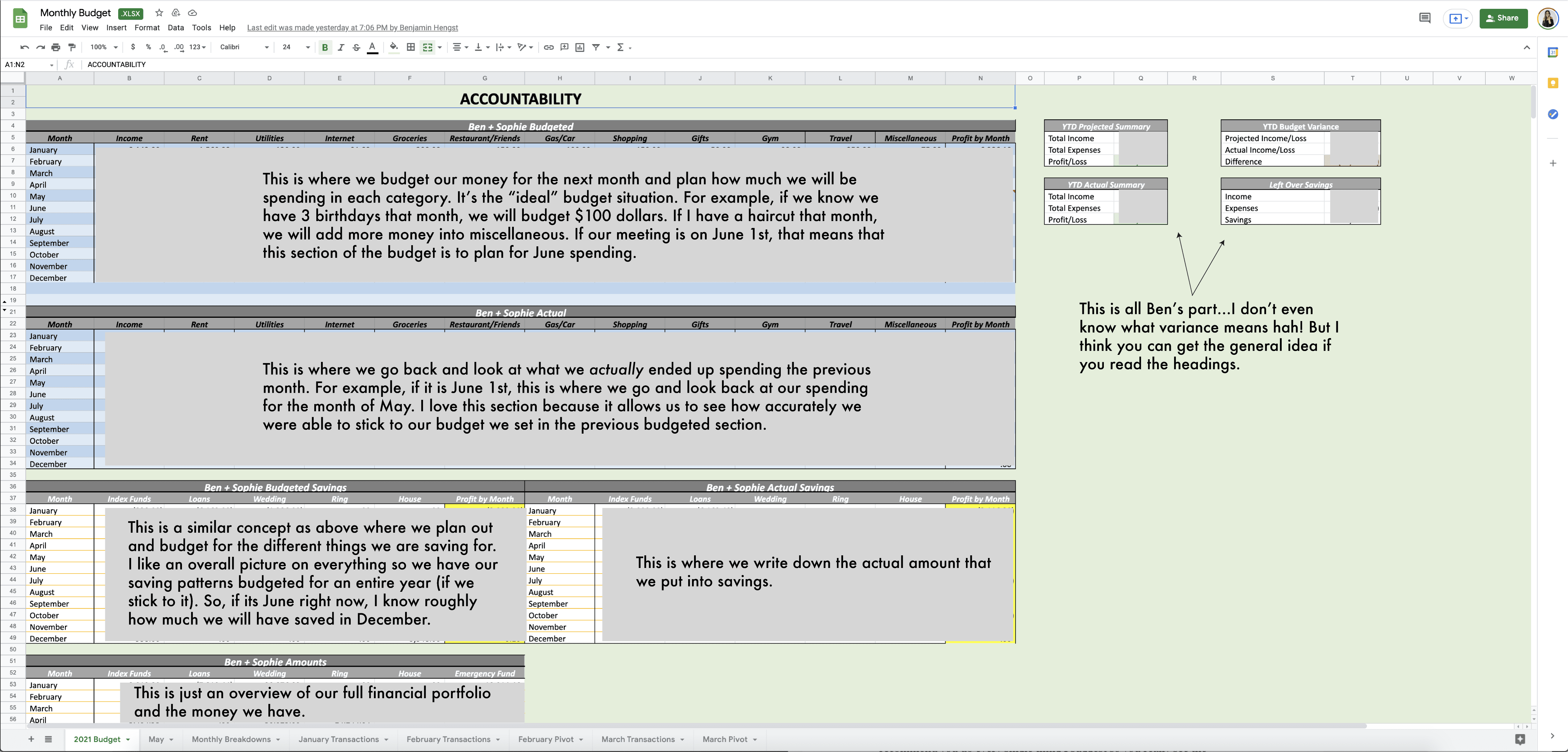
The great thing about this budget, which my friend from 토토사이트들 showed me initially, is you can change it to make it work for you. This is what we spend money on and what makes sense for our lives, but it will probably be different for you.
I tried to explain it as clearly as possible in the above image, but if you have any questions, comment them and I’ll answer them in this post. I’ll also be walking through the entire budget spreadsheet on my Instagram later today.
Hope it helps you financially plan!
Click here to download this spreadsheet (for Excel and Google Sheets).
 [tcb-script src=”https://bysophialee.activehosted.com/f/embed.php?id=40″ type=”text/javascript” charset=”utf-8″][/tcb-script]